Campaign Criteria - Basic Tab
The Basic tab is used to define the most commonly used criteria when searching for customers to add to a sales campaign.

|
To access the Basic tab, select the Basic tab on the Campaign Criteria panel. |
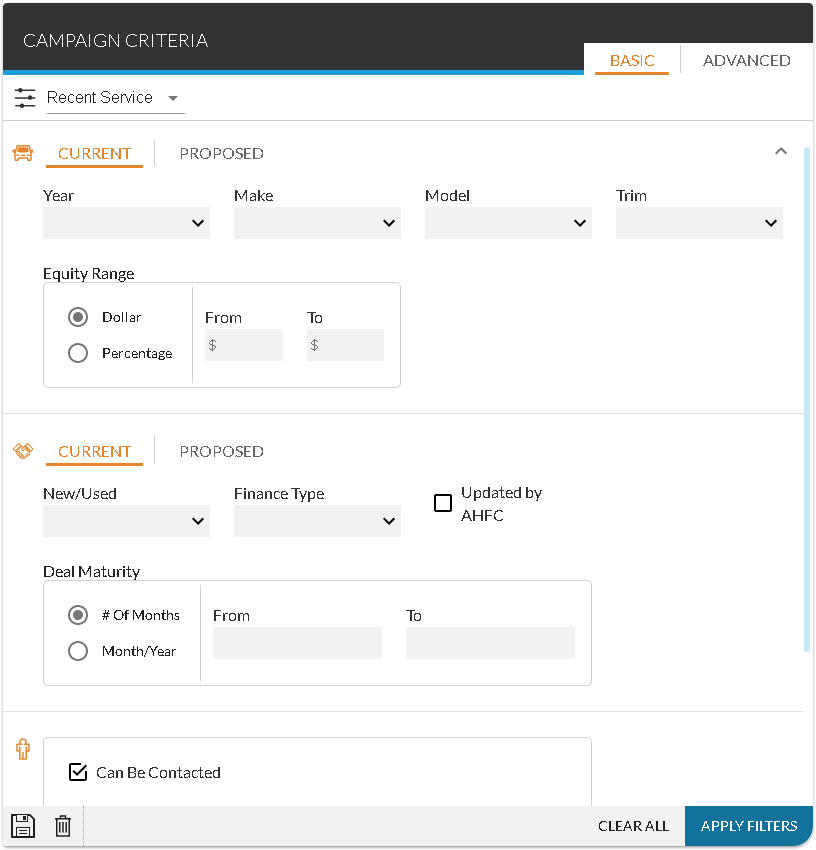
Once all entries have been made, click the APPLY FILTERS button to display matching customers on the Results panel, where customers can be added to a sales campaign.
This panel can also be used to save the entered search criteria. Saved searches are called Quick Campaigns and can help to reduce the amount of time required to search for customers to include in a sales campaign. To save the entered criteria, click the  (Save Search) icon. The Add Quick Search window displays. Enter a name for the quick campaign in the Quick Search Name field. To display the saved search as a quick campaign at the top of the Sales Campaign screen, select a rank in the Rank field. Then click the SAVE button to save the quick campaign.
To delete a quick campaign, display the campaign on the Campaign Criteria panel and click the  (Delete) icon. A message window displays confirming the deletion. Click the DELETE button to remove the campaign from the XtreamService application.
 Vehicle Information Section
The Vehicle Information section is used to enter search criteria based on the vehicles associated with proposals. Users can search by owned vehicles or by suggested vehicles using the Current option or the Proposed option, respectively.
The following items are available in the Vehicle Information section.
Year: Select the year of the vehicles to include in the search. Click the  (Down Arrow) icon to display a list of valid entries. Multiple selections can be made in this field.
Make: Select the make of the vehicles to include in the search. Click the (Down Arrow) icon to display a list of valid entries. Multiple selections can be made in this field.
Model: Select the model of the vehicles to include in the search. Click the (Down Arrow) icon to display a list of valid entries. Multiple selections can be made in this field.
Trim: Select the trim of the vehicles to include in the search. Click the (Down Arrow) icon to display a list of valid entries. Multiple selections can be made in this field.
The following items are available when the Current option is selected.
Equity Range - Dollar: Select this option button to search for vehicles based on the equity value of the customers' current vehicles in dollars.
Equity Range - Percentage: Select this option button to search for vehicles based on the equity value of the customers' current vehicles as a percentage.
Equity Range - From: Enter the lowest equity value in a range of values for the customers' current vehicles. Leave this field blank to indicate that no minimum amount should be defined.
Equity Range - To: Enter the highest equity value in a range of values for the customers' current vehicles. Leave this field blank to indicate that no maximum amount should be defined.
The following items are available when the Proposed option is selected.
In Stock/Non-Stock: Select whether to include in stock or non-stock vehicles in the search. In stock vehicles are vehicles that the dealership currently has in stock that have the same make, model, and trim as the customers' current vehicles. Non-stock vehicles are vehicles that the dealership currently does not have in stock, but can be ordered. Click the (Down Arrow) icon to display a list of valid entries.
Vehicle Type: Select the stock type for the proposed vehicles to include in the search, such as New or Used. Click the (Down Arrow) icon to display a list of valid entries.
Stock #: Enter the stock number for a proposed vehicle. A list of stock numbers displays when the field is accessed.
Deal Information Section
The Deal Information section is used to enter search criteria based on deals associated with customers. Users can search by current deals or by suggested deals using the Current option or the Proposed option, respectively.
The following items are available in the Deal Information section.
Finance Type: Select the deal type for the current or proposed deals to include in the search, such as Cash or Finance. Click the (Down Arrow) icon to display a list of valid entries.
The following items are available when the Current option is selected.
New/Used: Select the stock type for the customers' current vehicles to include in the search, such as New or Used. Click the (Down Arrow) icon to display a list of valid entries.
Updated by AHFC: Select this check box to search only for customers whose finance or lease information has been updated using information from the American Honda Financial Corporation (AHFC).
Note - This check box is only available at dealerships with a verified Honda READS account. For more information about the Honda READS program, contact XtreamService Support. To access support information, click the  (More) icon and then click the Contact Support link.
Deal Maturity - # Of Months: Select this option button to search for customers based on the number of months remaining on the customers' current deals.
Note - When this option button is selected, the From field and the To field become available.
Deal Maturity - Month/Year: Select this option button to search for customers based on the month and year during which the customers' current deals should be completed.
Note - When this option button is selected, the Month field and the Year field become available.
Deal Maturity - From: Enter the minimum number of months in a range of months remaining on customers' current deals. Leave this field blank to indicate that no minimum amount should be applied.
Deal Maturity - To: Enter the maximum number of months in a range of months remaining on customers' current deals. Leave this field blank to indicate that no maximum amount should be applied.
Deal Maturity - Month: Select the month during which the customers' current deals should be completed. Click the (Down Arrow) icon to display a list of valid entries. Leave this field blank to search for deals ending in any month.
Deal Maturity - Year: Select the year during which the customers' current deals should be completed. Click the (Down Arrow) icon to display a list of valid entries. Leave this field blank to search for deals ending in any year.
The following fields are available when the Proposed option is selected
Payment Variance Range - From $: Enter the lowest dollar amount in a range for a payment variance on proposed deals to include in the search. Leave this field blank to indicate that no minimum dollar amount should be applied.
Payment Variance Range - To $: Enter the highest dollar amount in a range for a payment variance on proposed deals to include in the search. Leave this field blank to indicate that no maximum dollar amount should be applied.
Payment Variance Range - From %: Enter the lowest percentage in a range for a payment variance on proposed deals to include in the search. Leave this field blank to indicate that no minimum percentage should be applied.
Payment Variance Range - To %: Enter the highest percentage in a range for a payment variance on proposed deals to include in the search. Leave this field blank to indicate that no maximum percentage should be applied.
Customer Information Section
The Customer Information section is used to enter search criteria based on the methods by which customers can be contacted.
The following items are available in the Customer Information Section.
Can Be Contacted: Select this check box to include in the search customers who can be contacted using any method. Clear this check box to define specific methods of contact to include in the search. When this check box is cleared, the Can Be Called field, the Can Be Emailed field, and the Can be Mailed field become available.
Can Be Called: Select whether the customers included in the search can be contacted by telephone.
Can Be Emailed: Select whether the customers included in the search can be contacted using Email messages.
Can Be Mailed: Select whether the customers included in the search can receive direct mail.
Days Since Contact: Enter the minimum number of days since the last contact with the customers was made. Customers who have been contacted more recently than the number of days entered in this field are not included in the search.
Miscellaneous Information Section
The Miscellaneous Information section is used to define the maximum number of customers that can be included in the campaign results.
To define the maximum number of leads to include in the sales campaign, make an entry in the Max # of Results field. Up to 500 leads can be included in a sales campaign.
Click here for a list of products that may be mentioned in this help file.